Free Quarterly Budget Template: Plan the Next 3 Months
A monthly budget tells you what is happening now. A quarterly budget helps you see what the next three months may demand before one expensive month catches you by surprise.
This guide explains how to build a practical three-month budget, what numbers belong in it, and how to use the free SimpleDocTools Quarterly Budget Template. It is designed for households, freelancers, and small teams that need a clear planning view without creating an account or learning spreadsheet formulas.
Printable quarterly budget PDFs
Start with a blank worksheet or a fictional example. These PDFs are printable references, not fillable forms. Use the browser editor to change values and calculate totals.
What a quarterly budget should answer
A useful quarterly budget is not just a longer monthly expense list. It should answer four questions:
- How much dependable income do you expect in each of the next three months?
- Which expenses stay fixed, and which ones change?
- Is any single month likely to run short even if the whole quarter remains positive?
- How much money may remain at the end of each month and across the full quarter?
That side-by-side view is the main advantage. A yearly total can hide short-term pressure, while a single-month budget can miss a large payment coming six or eight weeks later.
When quarterly planning works better than monthly planning
A quarterly budget is especially useful when your money is uneven. Freelancers may have projects that pay in different months. Small businesses may face quarterly insurance, tax, inventory, or software costs. Families may be preparing for travel, tuition, holidays, or seasonal utility bills.
It does not replace a monthly budget. Use the monthly view for day-to-day control and the quarterly view for timing, trends, and upcoming pressure. If you only need to track one month, start with the Monthly Budget Template. If you need to compare three months at once, the quarterly format is the clearer choice.
Step 1: Choose the three-month period
Start by naming the quarter and its months. You can use a calendar quarter such as January through March, or any three-month planning window that fits your situation.
Keep the period specific. “Q4 2026” is better than “Next quarter” because a saved PDF should still make sense when you open it later.
Step 2: List realistic income for each month
Create a separate row for every meaningful income source: salary, contract work, product sales, service revenue, benefits, or another dependable source. Enter the amount in the month when you realistically expect to receive it.
Use confirmed or conservative numbers where possible. A budget becomes less useful when uncertain income is treated as guaranteed. If a payment is only possible, either leave it out or label it clearly so you know the plan depends on it.
Step 3: Separate fixed, variable, and one-time expenses
Fixed expenses are the easiest place to start: rent or mortgage, payroll, insurance, subscriptions, loan payments, and other bills that remain predictable. Then add variable expenses such as groceries, utilities, fuel, supplies, shipping, or marketing.
Finally, add expenses that happen once during the quarter. Examples include annual renewals, equipment purchases, school costs, travel, seasonal inventory, or a professional fee. Put each expense in the month when the money will actually leave.
Step 4: Read each month before reading the total
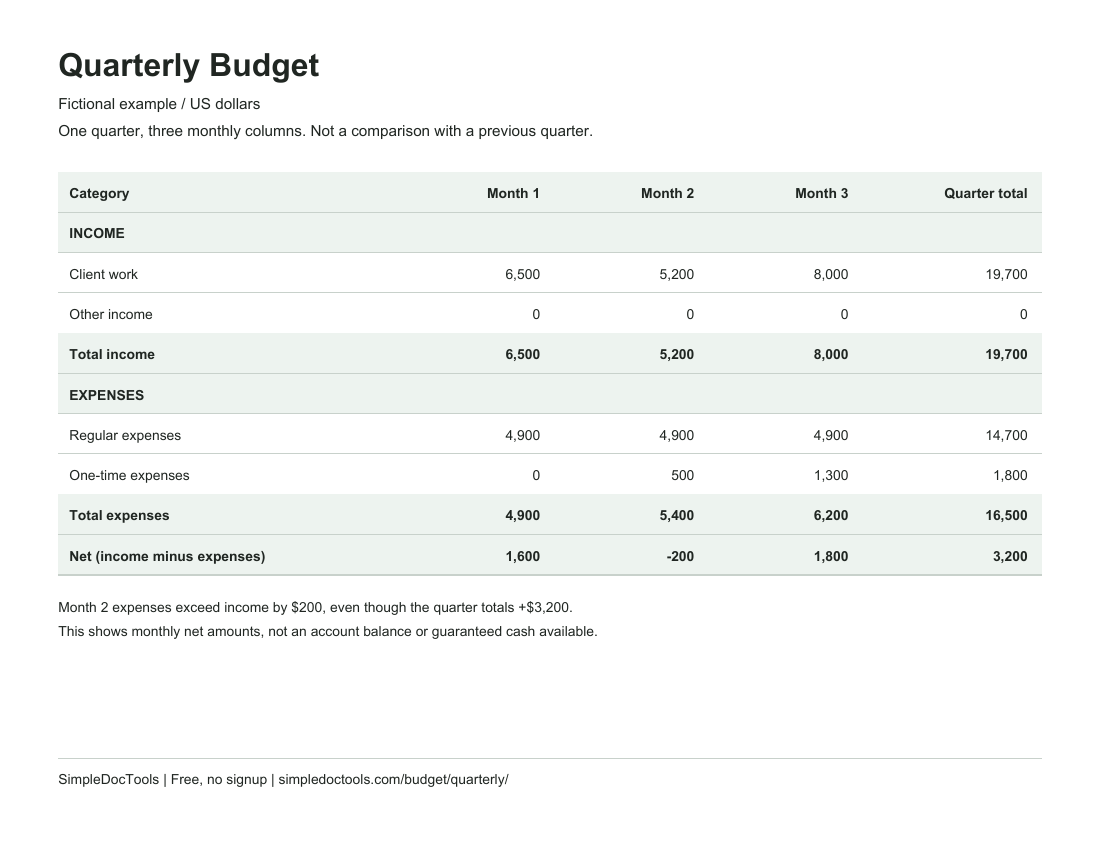
Suppose a three-month plan looks like this:
| Period | Income | Expenses | Net |
|---|---|---|---|
| Month 1 | $6,500 | $4,900 | $1,600 |
| Month 2 | $5,200 | $5,400 | -$200 |
| Month 3 | $8,000 | $6,200 | $1,800 |
| Quarter | $19,700 | $16,500 | $3,200 |
The quarter is positive overall, but Month 2 has $200 more expenses than income. That is a monthly net amount, not proof that an account will run out of money: the template does not include an opening balance or the dates of individual payments. Review those separately before making a decision. The side-by-side totals help you see which month needs a closer look.
Step 5: Build the budget in SimpleDocTools
- Open the Quarterly Budget Template.
- Set the title, quarter, currency, and three month names.
- Replace the example rows with your own income and expense categories.
- Use Add income row or Add expense row when you need more categories.
- Review the monthly totals and the full-quarter total in the live preview.
- Save the finished budget as a PDF. On a phone, use the Print / Save PDF flow shown by your device.
The editor recalculates the totals as you type. Your budget information stays in your browser by default. There is no account requirement, and the template does not ask for an email or payment before you save the document.
How to compare the plan with actual results
The current template shows one set of values for each month rather than separate planned and actual columns. A simple workflow is to save the original plan as a PDF, then return to the same browser later and replace the estimates with actual numbers. Save the updated version with “Actual” in the title and compare the two files.
This keeps the template simple while still giving you a record of what you expected and what happened. For detailed bookkeeping, tax reporting, or account reconciliation, use dedicated accounting software or advice from a qualified professional.
Common quarterly budgeting mistakes
- Using optimistic income: build the base plan around money you reasonably expect.
- Dividing every bill evenly: enter costs in the month they are due.
- Ignoring one-time expenses: renewals and seasonal purchases can change the entire quarter.
- Looking only at the quarter total: check whether any individual month goes negative.
- Never updating the plan: revisit the numbers when income, dates, or costs change.
Frequently asked questions
Is the quarterly budget template free? Yes. The template is currently free to use, with no signup and no paywall before saving the PDF.
Can I use it for a household budget? Yes. Rename the rows for salary, housing, utilities, groceries, transportation, savings, travel, or any categories that match your household.
Can a freelancer or small business use it? Yes, for basic planning and cash-flow visibility. It is not a replacement for bookkeeping, accounting, or tax software.
Does SimpleDocTools store my budget? Your document data stays in your browser by default. Clearing browser storage or changing devices can remove it, so save a PDF or export your data when you need a backup.
What if I need a different layout? Browse all budget templates, including monthly, business, summary, comparison, and category-based formats.